GitHub integration
Add GitHub to your link in bio
Add the GitHub Commits block to your Linky page to display your recent GitHub commit activity over roughly the past 30 days - a live proof-of-work signal that requires only your GitHub username.

Integration
GitHub blocks
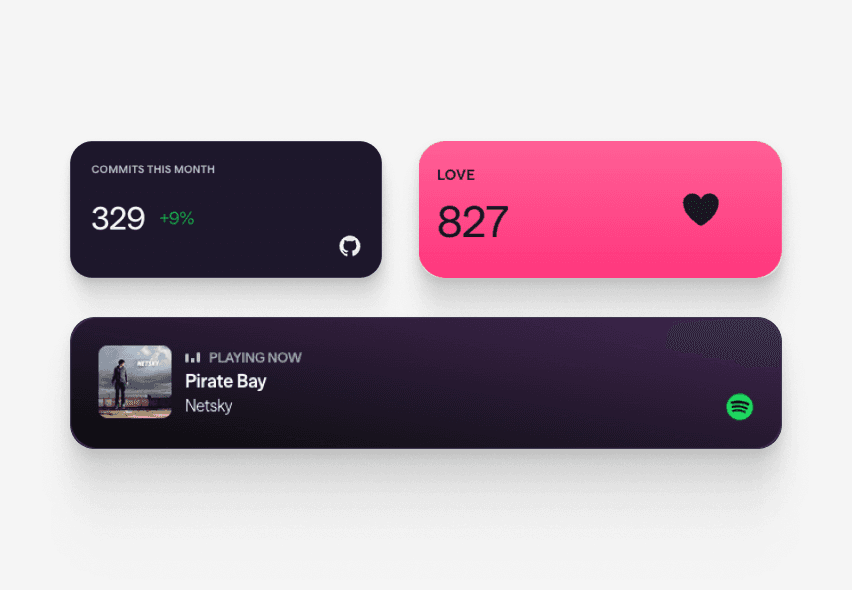
Commits This Month
Shows the total number of commits you have made in roughly the past 30 days, reflecting your recent GitHub activity with no OAuth connection required.
What you can show
Live GitHub content on your page
These blocks connect directly to GitHub and refresh automatically - your page always shows the latest.
- Commits This Month
Shows the total number of commits you have made in roughly the past 30 days, reflecting your recent GitHub activity with no OAuth connection required.
Why Linky
Why creators choose Linky
- Custom domains
- Connect your own domain on a paid plan to make your page feel truly yours.
- Beautiful themes
- Make it yours with custom colours, fonts, and a palette that matches your brand.
- Rich blocks
- Music, video, social feeds, and more - not just links. Your page stays fresh automatically.
- Analytics
- See views and clicks on your blocks and links with built-in analytics on Premium.
- Fast & simple
- Build your page in minutes with a drag-and-drop editor. No coding required.
- Verified pages
- Get a verified badge on your page to show your audience that it is the real you.
Drag and drop
Build your page in minutes
Add any block from the editor, connect your accounts, and hit publish. Linky fetches the latest data from your integrations automatically so your page stays fresh without any manual work.
01
What your GitHub block shows
The GitHub Commits block counts your recent commit contributions over a rolling window of roughly the past 30 days and displays that number on your Linky page. It is a live activity signal - visitors see a number that reflects your recent shipping cadence rather than a static badge. Only your GitHub username is needed; no OAuth connection or personal access token is required from you.

Playing Now
ten
Fred again
Live blocks that refresh automatically

A real Linky page
02
How to add GitHub commits to your Linky page
In the Linky editor, add the "Commits This Month" block from the GitHub section. You will be prompted to enter your GitHub username - that is all the configuration required. Because the block uses a server-side GitHub API connection, no OAuth authorisation or personal token is needed from you. Hit publish and your commit count will be live on your page within seconds.
03
Why developers use it on their personal page
Developers, open-source maintainers, and engineering job seekers use the commits block as a concise proof-of-work signal. Rather than linking to a GitHub profile and hoping visitors dig through repositories, the block surfaces the headline metric - how active you are right now - right on your link page. It is particularly useful on a personal site or portfolio landing page where you want to communicate that you are actively building.
Built-in analytics on every page



Bring all your socials together
04
Pair it with links to your best work
The commits block pairs naturally with Link Box blocks pointing to your key repositories, portfolio, or personal website. Add a Stack block grouping your open-source projects or a Content block with a short bio, and you have a developer-focused link page that says more about your work than any resume summary line. Choose a minimal, dark palette to reinforce the technical aesthetic.
Frequently asked questions
Everything you need to know to get started.
Free forever
Your page is one username away
Claim your link in bio and have it live in minutes - free, no credit card.
No credit card · Connect a custom domain anytime · Cancel whenever